


Mobiles are fast becoming the platforms of choice for all we do in life – browsing, chatting, other social interactions, & even starting to be used for learning delivery as well. At Upside Learning we’ve been creating various learning applications for mobile devices including apps for iPhone, Blackberry, & Android; browser based courses; short movies/animations etc. While working on these we have identified creating graphics for mobile devices is quite a challenge – especially if you are new to it.
In this brief note, I share five tips which will make creation of graphics for mobile devices less painful.
1. Screen Size & Resolution:
Each mobile device has a different size & resolution (even different models from same manufacturer -except iPhone). You can’t simply design for one size & resolution but need to actually create multiple graphics like the below example show different images for different devices.

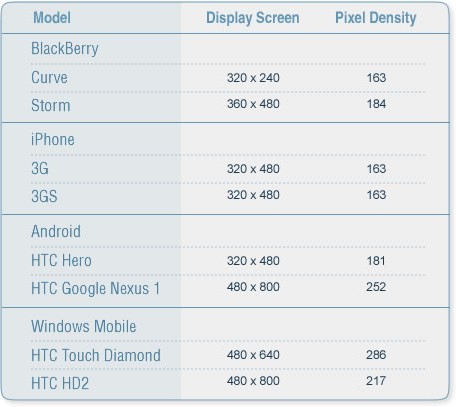
Further here’s a list of S&R of some popular devices.
2. Flexible Design:
Except for Blackberry most other smart phones have G-sensor, which understands the orientation of the phone and displays information accordingly – in landscape or portrait depending upon how the handset is held. Here as a designer we can apply the fundamentals of fluid layout. Background images used in application can be tiled or stretched. In case of Blackberry apps separate images need to be created for each model to fit the screen.

3. Colors:
Amongst the smart phones HTC & Blackberry support 65K colors, while iPhone & Nokia support 16 million colors. Naturally 16M colors show better graphics with brighter, sharper & clearer images.But if you are on Windows PC, while creating graphics for iPhone, you need to set “Proof Setup” under “View” Menu to “Macintosh RBG”; this will help correct colors. This will create a soft proof of colors to simulate standard Mac OS color palette; hence it will help choose colors and contrast.

4. Image Formats:
.png should be your preferred format (as against .gif) as it has greater color depth and is fully lossless with variable transparency. While .gif format has either opaque or fully transparent pixels .png has up to 254 levels of partial transparent pixels allowing you to take advantage of alpha transparency.

5. Animations:
Since most smart phones don’t support Flash (at this moment) animations can be done by calling images in a sequence through programming. You can also create animations in Flash and convert that to video formats that the smart phones support. Here’s a table of various video & audio formats supported by smart phones.